
Note: To enable AI-powered candidate report analysis, you must first opt in and enable the Project grading & report analysis AI feature in your account settings.
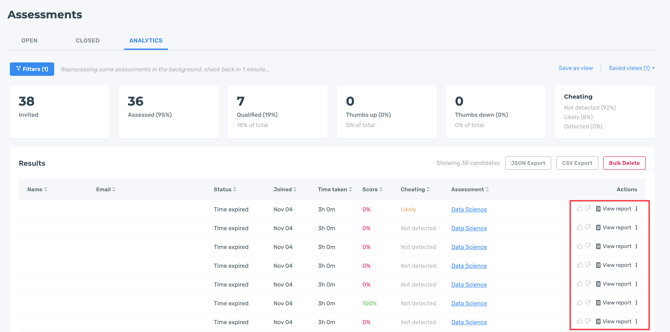
Every candidate who completes an Assessment will have a report that you can open from the analytics dashboard.
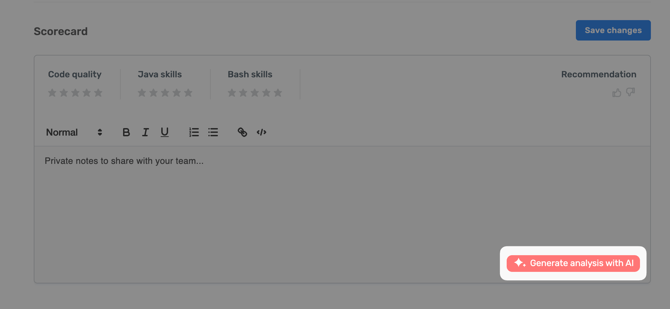
If you have opted in and enabled the Project grading & report analysis AI feature, you will see the option to click Generate analysis with AI in the Scorecard section of the candidate report.
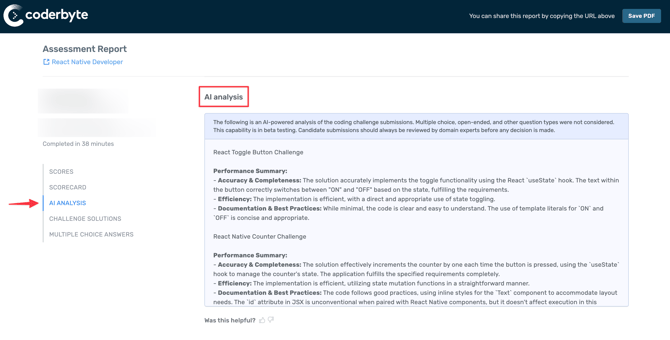
An automatically generated summary of the candidate's coding challenge submissions and any take-home project challenge grading, if they're selected on an assessment, will appear.
Report Analysis
The summary provides a review of a candidate's performance on the following topics within individual challenges:
- Accuracy & Completeness
- Efficiency
- Documentation & Best Practices
This is followed by a general analysis of a candidate's technical abilities and understanding of programming languages.
Multiple choice, open-ended, and other question types are not considered. Please note candidate submissions should always be reviewed by domain experts before any decision is made.
Project grading
If AI grading is enabled on take-home projects, candidates will be automatically assessed based on a custom rubric designed to evaluate best practices and technical coding abilities. The AI-generated analysis will display numerical scores in addition to a summary.