
Note: To run agentic phone screens, you must opt in and enable the Phone Screening AI feature in your account settings.
Every completed phone screen includes a report accessible from that job's dashboard. You can view a sample report here.
To view a report, navigate to Screening in the main navigation bar, select AI Phone Screens, open the relevant job, and click View Report.
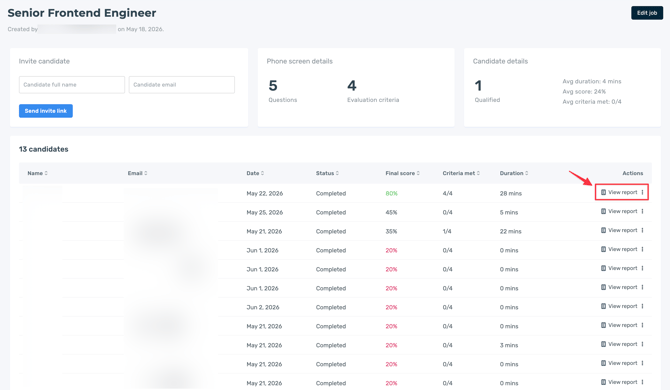
The phone screen report provides an evaluation of each candidate's AI phone screen, highlighting their responses, performance against screening criteria, and overall fit for the role.
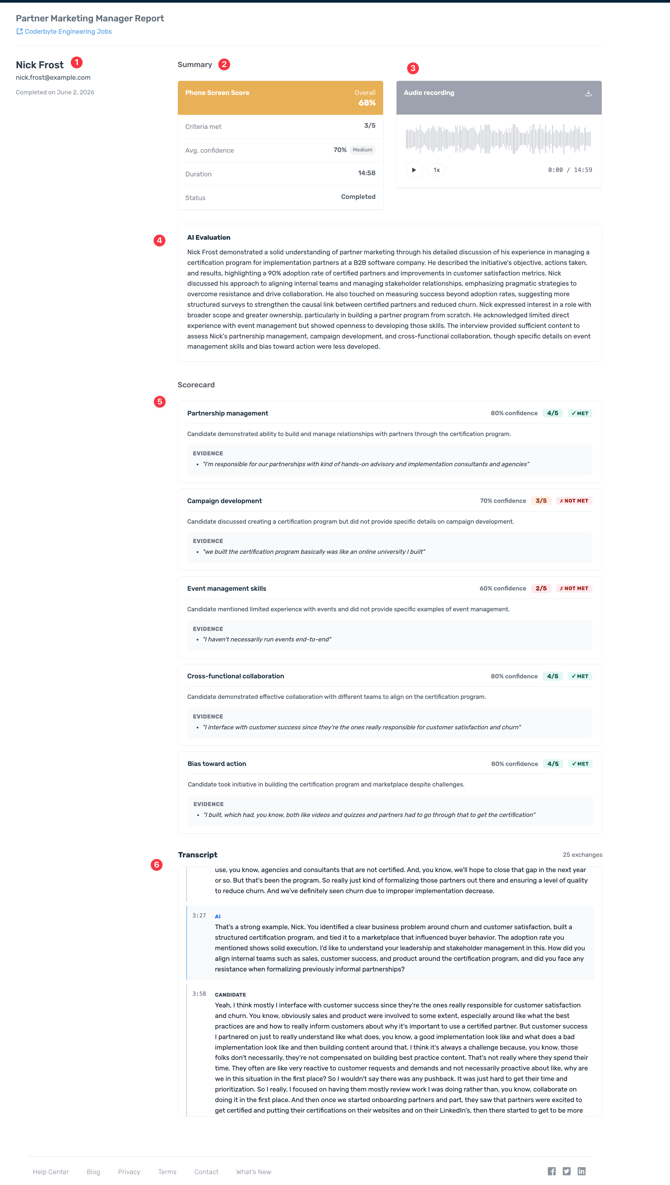
The sections below explain each area of the report:
1. Candidate information: Provides the candidate's name, email address, and the date the phone screen was completed.
2. Summary: Displays an overview of the phone screen results, including the candidate's final score, number of criteria met, average confidence score, interview duration, and current status.
3. Audio recording: Access to the complete audio recording of the phone screen interview for review of the candidate's responses and communication.
4. AI evaluation: Highlights the candidate's relevant experience, strengths, areas for development, and overall performance through an AI-generated summary of the interview.
5. Scorecard: Shows each evaluation criterion, its confidence score, whether it was met, and supporting evidence generated from the candidate's responses to explain the evaluation.
6. Transcript: Includes the complete transcript of the phone screen interview, including all questions and candidate responses.