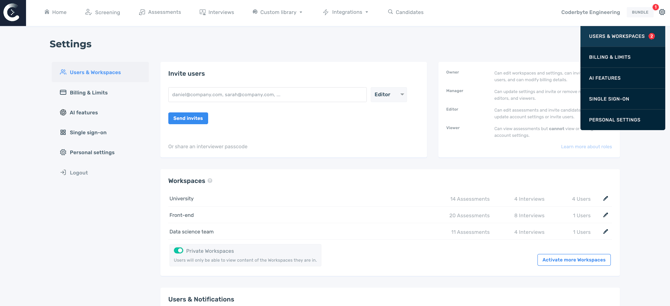
First, navigate to Users & Workspaces on your Account Settings page.
User roles
You can have unlimited users for each role type. Please refer to the table below for permissions per role:
| Owner | Manager | Editor | Viewer | |
| Manage billing | Yes | No | No | No |
| Invite and remove users to account | Can invite users with any permission level | Can invite users with Manager, Editor, and Viewer permission levels | No | No |
| Settings | View and update | View and update | View | No |
| Public workspaces |
Create, access, modify, and add content or invite users to any workspace | Access and add content to any workspace | Access content in any workspace | Access content in any workspace |
| Private workspaces | Create, access, modify, and add content or invite users to any workspace | Access and add content to provisioned workspaces | Access to provisioned workspaces and uncategorized content | Access to provisioned workspaces and uncategorized content |
| Invite candidates | Yes | Yes | Yes | No |
| Assessments | Create, modify, delete | Create, modify, delete | Create, modify | View |
| Interviews | Create, modify, delete | Create, modify, delete | Create, modify | Access |
| Interview default settings | Modify | View | View | View |
| Custom challenges and files | Create, modify, delete | Create, modify, delete | Create, modify | Access |
| Custom templates | Create, modify, delete | Create, modify, delete | Create, modify, delete | View |
| Thumb up/down | Yes | Yes | Yes | No |
| Webhooks | Access, modify | Access, modify | No | No |
| Custom consent requirements | Modify | View | View | View |
| Screening | Create, modify, delete | Create, modify, delete | Create, modify, delete | Create, modify, delete |
Note: If you just want to give an individual access to conduct interviews, consider using an interview passcode instead.
API, ATS & MCP Permissions
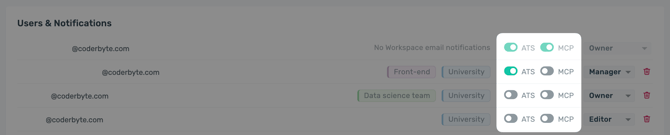
With the API, ATS & MCP add-on enabled, Owners can enable the ATS or MCP toggle for other users.
-
Enabling ATS allows users to manage ATS integrations, which by default includes access to the API key. Access to the API key is always available to Owners and Managers.
- Enabling MCP allows users to connect the Coderbyte MCP to an AI platform.